AI Agent for Slack Help Desk Solutions: What to Look For
See what to look for in an AI agent for your Slack help desk, from instant answers and ticket tracking to workflows and reporting.

Your team lives in Slack, but your help desk doesn't. Requests pile up in busy channels, someone promises to "circle back," and the thread scrolls out of sight. An AI agent for a Slack help desk closes that gap by handling support where the request was actually made.
This guide covers what one of these agents does, the criteria that separate a real solution from a thin bot, and how Wrangle delivers against each of them.
Wrangle is AI-powered ticketing and workflow automation for internal and external teams across Slack, Microsoft Teams, and email, and conversational ticketing is how it works: a request is captured, owned, and resolved inside the thread where it was asked.
What an AI Agent for a Slack Help Desk Does
An AI agent for a Slack help desk is software that lives inside Slack and handles incoming requests in channels and DMs. It reads a question as it comes in, answers the common ones automatically from a connected knowledge base, and creates a ticket for anything it can't resolve on its own.
From there it routes the ticket to the right owner and hands off to a human agent when needed. The requester stays in the same conversation the whole time. There's no portal to find, no form to hunt down, no second tool to learn.
Compare that with a legacy help desk. Traditional portals ask the requester to leave Slack, log in somewhere else, and file a ticket in a system they never check again. Every one of those steps is a reason the request never gets filed at all.
What to Look for When Evaluating One
Not every tool that bolts a bot onto Slack earns the name. Here are five criteria to hold any option against.
Conversational Ticketing, Not a Separate Portal
The ticket should live in the thread where the request was made, not in a system the requester has to open a browser tab to reach. Force people to a separate portal and you break the loop between asking for help and getting it tracked.
The result is predictable. People don't want to switch apps to file a request, so they don't. They post in a channel, hope someone sees it, and the request quietly dies when nobody does. A conversational agent keeps the request and its resolution in the same place, so nothing has to be re-entered to be counted.

AI That Answers Before a Human Has To
A good agent resolves questions without a person touching them. That means pulling answers from your team's actual knowledge: internal docs, connected tools, and the history of past tickets, not a generic model guessing at your policies.
This is where deflection pays off. Wrangle reports that its AI deflects more than 75% of common questions before they need a human agent. Every one of those is a request an agent never has to open, which frees the team for the work that genuinely needs a person.
Ticket Tracking and Visibility for Managers
Once a request becomes a ticket, a manager needs to see its status, its owner, its SLA, and how the load is spread across the team. Without that view, work happens in the dark and nobody can say what the team is actually carrying.
Visibility is also how a team argues for headcount. When you can show the true volume of requests coming in, where they stall, and how long they take, a staffing conversation stops being a guess. Accountability follows from the same data: a tracked ticket has an owner, and an owner can be followed up.
Workflow Automation for Recurring Requests
A help desk isn't only one-off questions. It's access requests, onboarding, software approvals, and the other processes that repeat every week with the same steps each time.
A capable agent runs these as structured workflows from inside Slack: custom forms to collect what's needed, routing to send each step to the right person, and approval steps that record who signed off. Handling recurring work this way keeps it off the ad hoc pile and leaves an audit trail behind it.
Native Slack Integration, Not a Bolt-On
"Native" means the tool uses Slack's own threading, notifications, and permissions rather than overlaying a separate interface on top of Slack. A native tool feels like part of Slack because it works through Slack, not beside it.
This matters for how requests move and who can see them. One specific marker: Wrangle is the only one of its competitors with a native Slack Workflow Builder integration, so workflows you build in Slack can trigger and connect to the help desk directly.
Slack's own customer story on Wrangle describes how its team built on Slack's Bolt framework and APIs so that any message in a channel, thread, or DM can become a trackable ticket.

How Wrangle Works as an AI Agent for Your Slack Help Desk
Here's how those criteria look in practice.
AI That Answers, Escalates, and Tracks in One Thread
A request comes in through Slack, and Wrangle AI answers it from connected knowledge: your Notion pages, web pages, and uploaded documents. The requester gets a response in the same thread, with nobody on the support side involved.
When the AI can't resolve something, that same conversation becomes a tracked ticket, with an owner, a status, a priority, and an SLA. Nothing is re-entered and the requester never leaves the thread.
The payoff shows up in the numbers Wrangle reports. Its AI deflects more than 75% of common questions before they need a human agent, and Wrangle customers have seen 60% faster ticket response times.
Workflows for the Requests AI Can't Handle Alone
Some requests need a process, not an answer. Wrangle runs these as no-code workflows built from custom forms, conditional routing, approval steps, and reminders, with progress and decisions recorded as they happen.
Think of an access request that needs a manager's sign-off, software provisioning that routes to IT, or an onboarding checklist that hands tasks to several teams in sequence. Wrangle coordinates the handoffs and keeps the audit trail, so the work gets done without anyone chasing people for status.
Many of these processes also need work done outside Slack. Wrangle's API and webhooks let your integrations create and update tickets, start workflows, exchange ticket replies, and retrieve conversation history, and the Wrangle MCP server lets compatible AI assistants search, create, and update tickets in plain language.
Wrangle's MCP support also connects requests to action across your tools: an AI assistant can use a request's context and approvals in Wrangle to carry out work in a connected system, then update the ticket when it's done.

Reporting That Shows What Your Team Is Actually Carrying
Wrangle reports on workload, response times, and bottlenecks across the team. You can see how many requests came in, who handled them, where they stalled, and how long they sat.
That data turns a staffing conversation from opinion into evidence. When you can prove your true request volume, you can make the case for headcount with real numbers behind it. On the service side, Wrangle customers have seen a boost of 50% or more in customer satisfaction.
Built for Slack, Available Across Channels and Email
Wrangle works across Slack, Microsoft Teams, and email. Internal teams in IT, HR, operations, and finance use it for their own requests, and external B2B support runs through Slack Connect and email, where an incoming email is handled from a Slack thread and replies go back out by email.
On security, Wrangle is SOC 2 compliant and supports GDPR through its DPA. That covers how it handles your data, without promising blanket confidentiality over everything that passes through it.
Is an AI Agent the Right Move for Your Slack Help Desk?
An AI agent earns its place once your request volume outgrows memory and goodwill. If your team handles more than a handful of requests a week, loses them in busy Slack channels, can't show leadership what it's actually carrying, or wants to scale support without adding headcount, this is the kind of tool built for that.
If that sounds like your team, the fastest way to see it is to run it on your own requests. Start a trial or book a demo at wrangle.io.
Wrangle learns from your tickets and knowledge base to handleup to 75% of Slack questions automatically.


4.7 Average rating


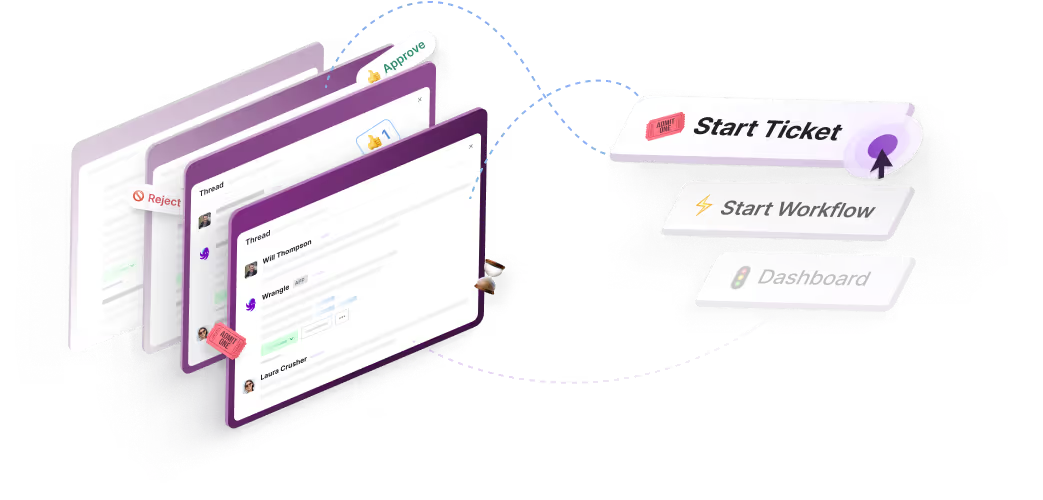
Turn Slack into a productivity powerhouse with Wrangle
Create a scalable helpdesk in Slack. Automatically turn messages into trackable tickets and provide faster, more transparent service to your colleagues and customers with Wrangle — Try it free!
Wrangle learns from your tickets and knowledge base to handleup to 75% of Slack questions automatically.
4.7 Average rating